Hello!
I'm Nitish Raj.
Hello!
I'm Nitish Raj.
Team of 3 Member: Rakesh Roshan, Ravi Sagoo & Nitish Raj
Team of 3 Member: Rakesh Roshan, Ravi Sagoo & Nitish Raj
Team of 3 Member: Rakesh Roshan, Ravi Sagoo & Nitish Raj
Nitish Raj
Nitish Raj
WORK
WORK
ABOUT
ABOUT
Hi, I'm Nitish Raj
A product designer
Focus on simplifying complex information systems
into inclusive human-centric experiences.
Incoming UX Design @ Microsoft
Hi, I'm Nitish Raj
A product designer
Focus on simplifying complex information systems
into inclusive human-centric experiences.
Incoming UX Design @ Microsoft

Hello!
I'm Nitish Raj
Hello!
I'm Nitish Raj
I’m a curious learner with a growth mindset & passion for innovation.
I like to work at an intersection where design, technology & psychology
meets and transform insights into meaningful experiences that
are simple yet impactful.
I’m a curious learner with a growth mindset & passion for innovation.
I like to work at an intersection where design, technology & psychology
meets and transform insights into meaningful experiences that
are simple yet impactful.
.png)
The System Design Project focuses on identifying the pain points with available band-aids when used for joints like elbows & knees, followed by designing a band-aid especially for joints that cover larger wounds
with minor injury and is relatively durable.
The System Design Project focuses on identifying the pain points with available band-aids when used for joints like elbows & knees, followed by designing a band-aid especially for joints that cover larger wounds
with minor injury and is relatively durable.
I’m a curious learner with a growth mindset & passion for innovation.
I like to work at an intersection where design, technology & psychology
meets and transform insights into meaningful experiences that
are simple yet impactful.
I’m a curious learner with a growth mindset & passion for innovation.
I like to work at an intersection where design, technology & psychology
meets and transform insights into meaningful experiences that
are simple yet impactful.
I’m a curious learner with a growth mindset & passion for innovation.
I like to work at an intersection where design, technology & psychology
meets and transform insights into meaningful experiences that
are simple yet impactful.
.png)

ShapeCrunch
The Project focuses on identifying the pain points of Joggers, Runners, & Athletes suffering from foot-related Orthotic problems, followed by designing a Mobile Application that reduces the processing & delivering time by 9X.
Duration: 4 months
Tools: Ps, Ai, Rhino, Keyshot, Figma, Zebris, Arduino
Project
Overview
Problem
When you have foot-related problems, the current treatment-solution is very analogue. This means that the customers/ patients are often left unsure when they will receive the solution & whats's wrong with their foot.
Solution
The goal of this project was to improve the overall experience of the customers/ patients in India & Singapore by making it time-efficient, live, dynamic & digital. For this, we capture images from the clicked pics of the foot to convert it into .stl and thus manufacture 3D printed solutions.
Impact
-
Shape Crunch has helped with its time-efficiency to more than 8000+ Customers
-
Shape Crunch has been rolled out to more than 3+ countries.
-
Customer Satisfaction for overall experience increases by 3.2X
-
Shape Crunch Application is being used globally by over 100000+ customers
-
Scaled the amount of deliveries per day by 9X.
My Role
- I was responsible for designing the app and optimizing it
throughout the pilot.
- For doing the user research with stakeholders.
- Did user interviews and usability testing in India.
- Responsible for creating the entire end-to-end UX flows
of Mobile and Web Application.
What I Did
-
Map out UX flows
-
UX Research
-
Gathering Potential users for critical insights
-
Research Co-ordination
-
Fostering Relationships and Understanding requirements with partners.
-
UI development
-
Usability Testing
Understand
Identified Research Area
Understand
User Research
Gathering Potential users for critical insights:
Interview Insights
Learning
Desk Research
People assume they know their correct shoe size, but a study published in 2011 by doctors at the New York University Hospital for Joint Diseases showed that 35% of people are off by at least half a size.
In a Buffer study, 43% of people never came back to the workshop/ Podiatrist to take back their insole and continued with foot problems.
NCBI study emphasizes that the width of the shoe is an important part of fit, highlighting the need for patient-specific footwear assessment and education for behavior changes.
A cohort study of patients shows only 30% of study participants reported to have accessed podiatry and 4% orthopedics
Key Painpoints


the research
understand & analysis
Opportunity Mapping
Stakeholder Mapping
Research Outcome
Empathy Mapping
Experience outcome
. . . . . . . . .
User Persona
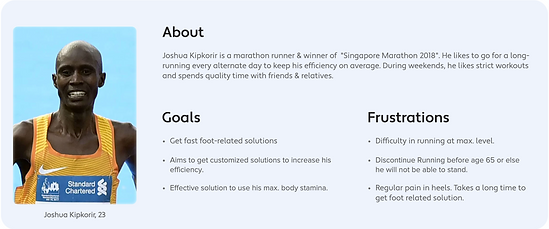
To understand user's needs and to mark their frustration and goal, user persona was made which will help us to narrow down the users need and priorities them.

Derived Statement
A platform to bridge the gap between Patient and Podiatrist/ Workshop team by enhancing the user experience of the customer, time-efficient processing, fast delivery, live tracking & scaling up production across the globe.
.jpg)
User Flow
This section shows how the user will order a new pair of customer insole in the workflow.
.jpg)
Version 0 ------------Version 1.0------------User Testing
User
Testing
Google form - Context/ Scenario - Task - Valuable feedback - User Interview
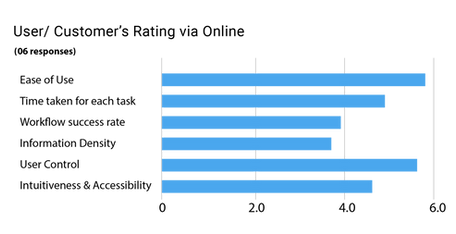
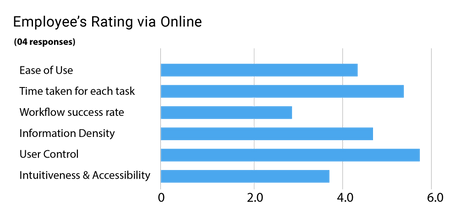
Online Remote User testing was conducted with 6 Customers & 4 Company Employees
in two days.
Users/ Customers from different locations and Company employees feedback was
taken on the basis of- Ease of Use, Time taken for each task, Workflow success rate, Information Density, User Control, Intuitiveness & Accessibility
Remote Testing Report:


Time-Motion Testing Report:
** Time taken by each user for each task was calculated on video conference live recording.
Visual Language & Brand Identity
Logo:

Font Family
Roboto
To give an identity, look & feel, certain typefaces and colors were selected for the mobile application to bring aesthetic to overall all design.
Colour Pallet:
#3CBEB3
#3C4043
#F7F7F7

Introducing Shapecrunch

The Mobile Application ensures brisk onboarding for the users. For user's ease of using, small micro-interactions as direction to click a good photograph with correct posture, options to mark different pain points on foot & other usage patterns available in classic design language.
.png)
Homepage
In this section, the user can get all the details like the latest hot deals, offers, clinic location, shopping, warranty details, customize insole, connect to doctors, read the blog, and can edit profile.

.png)


Customize Insole
A section where. the users are directed to click pictures of their foot in a certain direction from three different angles.
Collecting Information
A section where the user has to enter specific personal details like name email id, address, weight, height, etc.
The user also needs to add information related to customization of insole like size, purpose, physical activity & type of shoes or sandals he or she wears.
Pain Pointer
In this section, users are directed to mark down the pain point area from the front and bottom side of the foot, then mark the area with numbers, against the intensity of pain in the foot.
Clinic Location
& Shopping
In this section, the user can explore the all different shape crunch clinic locations and book appointments. Users can also do the shopping & explore all the latest customizable footwear which includes insole, sandales & shoes
Payment
In this section, the users proceed to the cart to pay by adding an address and billing with a unique tracking number. Users can also go through the Order history to view previously bought products with their status.
Interactive Prototype
My Learning
-
User interviews helped me to know a lot of hidden major & minor problems, which could not be accessed without taking the personal interviews.
-
Usability test round 3 opened my eyes that with a small miss-information the user gets lost while using the application, so UX language is very important for it.
-
In usability testing round 4, one of the user suggested me to add a text box in the painpoint area, for which a lot of users from different regions have a diff. style of conveying pain, & for doctors its imp. to know for them. so I did the integration.

Version 1.1.1 of this app is available on Play store
